OOM Deployment using ArgoCD
Besides the deployment of ONAP using helm as described in OOM Helm Release Deployment, you can use GitOps based deployment of ONAP components using ArgoCD or Flux (see GitOps deployment). This document shows an example for an ArgoCD (see ArgoCD) based installation.
General principles of GitOps and ArgoCD
GitOps is a modern approach to continuous delivery and infrastructure management that uses Git as the source of truth for both application and infrastructure configurations.
In GitOps, all changes to the system, such as updates or rollbacks, are made through pull requests in Git repositories, which then trigger automated deployment pipelines.
This ensures that the environment is always aligned with the desired state defined in the Git repository, making the system more predictable and auditable.
ArgoCD is a Kubernetes-native continuous delivery tool that implements GitOps principles. It monitors Git repositories for changes in configuration files (such as YAML or Helm charts) and automatically syncs the state of the Kubernetes clusters to match the desired configuration. With ArgoCD, users can track application deployments and changes visually through a web UI or CLI, providing transparency and easy rollback options. It also supports multi-cluster deployments and offers strong access control mechanisms to manage who can trigger changes. The system is highly automated and allows for fast, secure delivery and operational consistency across environments.
OOM support for ArgoCD deployment
In the OOM repository a subtree is provided, which contains ArgoCD Application definitions and other files supporting the installation using ArgoCD:
An example structure of the OOM common helm charts is shown below:
argo
├── argocd
│   ├── app-argocd.yaml
│   ├── kustomization.yaml
│   ├── argo-project.yaml
│   ├── argo-secret.yaml
│   ├── argocd.yaml
│   ├── values
│   │   └── argocd.yaml
├── infra
│   ├── app-infra.yaml
│   ├── kustomization.yaml
│   ├── certmanager.yaml
│   ├── chartmuseum.yaml
│   ├── compile-onap.yaml
│   ├── ...
│   ├── values
│   │   ├── certmanager.yaml
│   │   ├── chartmuseum.yaml
│   │   ├── compile-onap.yaml
│   │   ├── ...
│   │   └── xxx.yaml
│   ├── compile-onap
│   │   └── helm
│   │       ├── Chart.yaml
│   │       ├── values.yaml
│   │       └── templates
│   │           └── onap-helm-render-job.yaml
│   ├── ...
├── onap
│   ├── app-onap.yaml
│   ├── kustomization.yaml
│   ├── a1policymanagement.yaml
│   ├── aai.yaml
│   ├── authentication.yaml
│   ├── cds.yaml
│   ├── ...
│   ├── values
│   │   ├── a1policymanagement.yaml
│   │   ├── aai.yaml
│   │   ├── authentication.yaml
│   │   ├── ...
│   │   └── xxx.yaml
├── onap-test
│   ├── app-onap-test.yaml
│   ├── kustomization.yaml
│   ├── kafka-ui.yaml
│   ├── onap-test-ingress.yaml
│   ├── testkube.yaml
│   ├── trivy-operator.yaml
│   ├── values
│   │   ├── kafka-ui.yaml
│   │   ├── onap-test-ingress.yaml
│   │   ├── testkube.yaml
│   │   └── trivy-operator.yaml
│   ├── ingress-routes
│   │   └── helm
│   │       ├── Chart.yaml
│   │       ├── values.yaml
│   │       └── templates
│   │           └── ingress-kafka-ui.yaml
│   ├── ...
└── update-variables.sh
The main folders are:
argocd
Application definition for the ArgoCD deployment
infra
Application definitions for required infrastructure components (e.g. Istio, CertManager, DB Operators, …)
Required Helm Charts for IngressRoutes, Kiali, ONAP Chart compilation
onap
Application definitions for ONAP components (e.g. AAI, CDS, SO, …)
onap-test
Application definitions for ONAP Test components and tools (e.g. Trivy Scan, Testkube, Kafka-UI)
General hints and preparation
Prerequisites
As prerequisite you would need a Kubernetes cluster with the required capacity to deploy the components into.
The Infrastructure (e.g. Bare Metal servers, Virtual Hosts) and the way of deployment (e.g. ClusterAPI, Kubespray) is not restricted.
In the tests of the OOM team it is done:
On a vanilla Openstack cluster
Using Terraform to create the tenant, VMs and networking
Using Kubespray to create the K8S cluster
Use a GitLab-CI pipeline to orchestrate the creation
At the end of the deployment you need to install ArgoCD in this cluster for the further process of installation.
As a input parameters for the ONAP deployment you would need to provide:
A local Git(lab) project to store the “argo” Application definitions (or the oom project)
Storage Class the cluster provides for PVs
(Optional) A local helm registry to store the ONAP helmcharts, if you don’t use the installed ChartMuseum
Preparation
Clone the OOM repository into a new Git(Lab) project
Replace the following variables with the script ‘updateVariables.sh’ (in argo subdir):
<ONAP_ARGO_REPO_URL> with the URL of the new git repo
<STORAGECLASS> with the default K8S storage class
<BASEURL> with the base DNS zone (e.g. “simpledemo.onap.org”)
<POSTADDR> with the postfix for the hosts (optional) (e.g. “-onap-00”)
<DOCKER_REPO> URL of the docker repository (‘docker.io’)
<ONAP_REPO> URL of the ONAP docker repository (‘nexus3.onap.org:10001’)
<ELASTIC_REPO> URL of the Elastic docker repository (‘docker.elastic.co’)
<QUAY_REPO> URL of the Quay.io docker repository (‘quay.io’)
<GOOGLE_REPO> URL of the K8S docker repository (‘gcr.io’)
<K8S_REPO> URL of the GoogleK8S docker repository (‘registry.k8s.io’)
<GITHUB_REPO> URL of the Github docker repository (‘ghcr.io’)
after setting the variables start the script in the argo dir: ‘./updateVariables.sh’
check-in the git project
To allow ArgoCD to access the
Git Repository, which contains the application definitions,
(optional) Helm Repository, which contains the compiled charts
you need to create secrets to define the repository and the access credentials. E.g.:
argo-secret.yaml
---
# Git Repository definition.
apiVersion: v1
kind: Secret
metadata:
  name: gitlab-onap-repo
  namespace: argocd
  labels:
    argocd.argoproj.io/secret-type: repository
stringData:
  url: <ONAP_ARGO_REPO_URL>
---
# Git Repository credentials, for using the same credentials in multiple repositories.
#apiVersion: v1
#kind: Secret
#metadata:
#  name: gitlab-onap-creds
#  namespace: argocd
#  labels:
#    argocd.argoproj.io/secret-type: repo-creds
#stringData:
#  url: <ONAP_ARGO_REPO_URL>
#  type: git
#  password: <GITLAB_API_READ_TOKEN>
#  username: <GITLAB_USER>
#---
# (optional) Helm Repository credentials, for using the same credentials in multiple repositories.
#apiVersion: v1
#kind: Secret
#metadata:
#  name: helm-repo-onap
#  namespace: argocd
#  labels:
#    argocd.argoproj.io/secret-type: repo-creds
#stringData:
#  url: <ONAP_HELM_REPO>
#  type: helm
#  password: ${HELM_PASSWORD}
#  username: ${HELM_USERNAME}
The secrets will be created during the ArgoCD “self-managed” deployment described in the later section.
General info about the installation of applications
In this example we use the “App of Apps” Pattern (see App of Apps) to install bundles of applications. E.g. we create an “onap” application containing multiple ONAP component applications (e.g. so, aai).
As definition of the “onap” application an “Application” resource is defined, which points to the directory ‘argo/onap’ in the examples.
app-onap.yaml
---
apiVersion: argoproj.io/v1alpha1
kind: Application
metadata:
  name: onap
  namespace: argocd
  finalizers:
    - resources-finalizer.argocd.argoproj.io
  labels:
    name: onap
spec:
  project: argo-management
  source:
    repoURL: '<ONAP_ARGO_REPO_URL>'
    targetRevision: <ONAP_ARGO_BRANCH>
    path: ./argo/onap
  destination:
    server: https://kubernetes.default.svc
    namespace: onap
  syncPolicy:
    automated:
      prune: false
      selfHeal: true
      allowEmpty: false
    syncOptions:
    - Validate=true
    - CreateNamespace=true
    retry:
      limit: 5
      backoff:
        duration: 5s
        factor: 2
        maxDuration: 3m
  revisionHistoryLimit: 10
The directory contains a kustomization.yaml file, which contains a resource definition pointing to the ONAP component application files in its subdirectories.
kustomization.yaml
# ============LICENSE_START=======================================================
#  Copyright (c) 2025 Deutsche Telekom
# ================================================================================
# Licensed under the Apache License, Version 2.0 (the "License");
# you may not use this file except in compliance with the License.
# You may obtain a copy of the License at
#
#       http://www.apache.org/licenses/LICENSE-2.0
#
# Unless required by applicable law or agreed to in writing, software
# distributed under the License is distributed on an "AS IS" BASIS,
# WITHOUT WARRANTIES OR CONDITIONS OF ANY KIND, either express or implied.
# See the License for the specific language governing permissions and
# limitations under the License.
#
#  SPDX-License-Identifier: Apache-2.0
# ============LICENSE_END=========================================================
---
apiVersion: kustomize.config.k8s.io/v1beta1
kind: Kustomization
resources:
  - a1policymanagement/application.yaml
  - aai/application.yaml
  - authentication/application.yaml
  - cds/application.yaml
  - cps/application.yaml
  - dcaegen2-services/application.yaml
  - multicloud/application.yaml
  - platform/application.yaml
  - policy/application.yaml
  - portal-ng/application.yaml
  - sdc/application.yaml
  - sdnc/application.yaml
  - so/application.yaml
  - uui/application.yaml
  - strimzi/application.yaml
  - common/cassandra.yaml
  - common/mariadb-galera.yaml
  - common/postgres.yaml
  - common/repository-wrapper.yaml
  - common/roles-wrapper.yaml
To add the ONAP application to ArgoCD for management, you can add it via kubectl command:
> kubectl apply -f argo/onap/app-onap.yaml
If you don’t want to use the “App of Apps” Pattern, you can also install the single applications, e.g.:
> kubectl apply -f argo/onap/so.yaml
User Guide for ArgoCD example
After preparation of the environment and git repository the following steps are executed:
Installation of “self-managed” ArgoCD
Installation of the Infrastructure Applications and compilation and storage of the ONAP charts
Installation of the ONAP Applications
Installation of the ONAP Test Applications
The separation of the deployment steps is done to ease the installation procedure and avoid dependency problems. But generally it should also be possible to install all applications at once and let ArgoCD deal with the deployment.
Installation of “self-managed” ArgoCD
After ArgoCD has been installed, you can add an “argocd” application to force ArgoCD to manage itself.
The definition files can be found in the directory ‘argo/argocd’:
app-argocd.yaml - (AppOfApps-)Application definition file points to the same directory and uses kustomization.yaml
kustomization.yaml - Kustomize file with resources collection (argocd.yaml, argo-project.yaml, argo-secrets.yaml)
argocd.yaml - Application definition for ArgoCD
app-secrets.yaml - Secrets for needed Git/Helm-repositories and credentials
app-project.yaml - ArgoCD Project definition
values/argocd.yaml - values definition used by argocd.yaml
To deploy the ArgoCD “self-managed” (AppOfApps-)application, you can add it via kubectl command:
> kubectl apply -f argo/argocd/app-argocd.yaml
You can now try to access the ArgoCD UI via Port Forwarding of the “argo-service”. The access credentials are “admin/gating”
Installation of the Infrastructure Applications
As ONAP requires a number of platform/infrastructure components, the installation of those are bundled in this “App of Apps” Application.
The definition files can be found in the directory ‘argo/infra’:
app-infra.yaml - (AppOfApps-)Application definition file points to the same directory and uses kustomization.yaml
kustomization.yaml - Kustomize file with resources collection for the “App of Apps” Application
cert-manager.yaml - Application definition for Certificate Manager
chartmuseum.yaml - Application definition for ChartMuseum (required for compile-onap)
compile-onap.yaml - Application definition a local helm chart used for local ONAP chart compilation
compile-onap/helm/* - Helm chart used for local ONAP chart compilation
django-defectdojo.yaml - Application definition for Defect-Dojo (used as Trivy Report UI)
gateway-api.yaml - Application definition for Gateway-API CRDs
gateway-api/* - CRD definitions of Gateway-API
infra-ingress.yaml - Application definition for a local helm chart for Ingress routes (ingress-routes)
ingress-routes/helm - Helm chart with ingress definition for Infra Applications and Ingress Gateway
istio.yaml - Application definition for Istio ServiceMesh
jaeger.yaml - Application definition for Jaeger
k8ssandra-operator.yaml - Application definition for K8ssandra-Operator
keycloak-db.yaml - Application definition for the Database instance for Keycloak
keycloak.yaml - Application definition for Keycloak
kiali-operator.yaml - Application definition for the Kiali-Operator
kiali.yaml - Application definition for the Kiali Instance
kiali-instance/* - Definition of the Kiali Instance
mariadb-operator-crds.yaml - Application definition for the MariaDB-Operator CRDs
mariadb-operator.yaml - Application definition for the MariaDB-Operator
mongodb-operator.yaml - Application definition for the MongoDB-Operator
nfs-server-provisioner.yaml - Application definition for the NFS Server Provisioner
postgres-operator.yaml - Application definition for the Postgres-Operator
prometheus.yaml - Application definition for the Prometheus
strimzi.yaml - Application definition for the Strimzi-Kafka-Operator
trivy-dojo-report-operator.yaml - Application definition for the Trivy-DefectDojo Connector
values/* - values definition for all infra applications
To deploy the Infrastructure (AppOfApps-)application, you can add it via kubectl command:
> kubectl apply -f argo/infra/app-infra.yaml
After the successful installation of the Ingress setup you should be able to start the ArgoCD UI via the URL:
https://argocd<POSTADDR>.<BASEURL>
Access credentials are “admin/gating”

You should see in the UI the Application trees of “argo-management” and “infra-components”
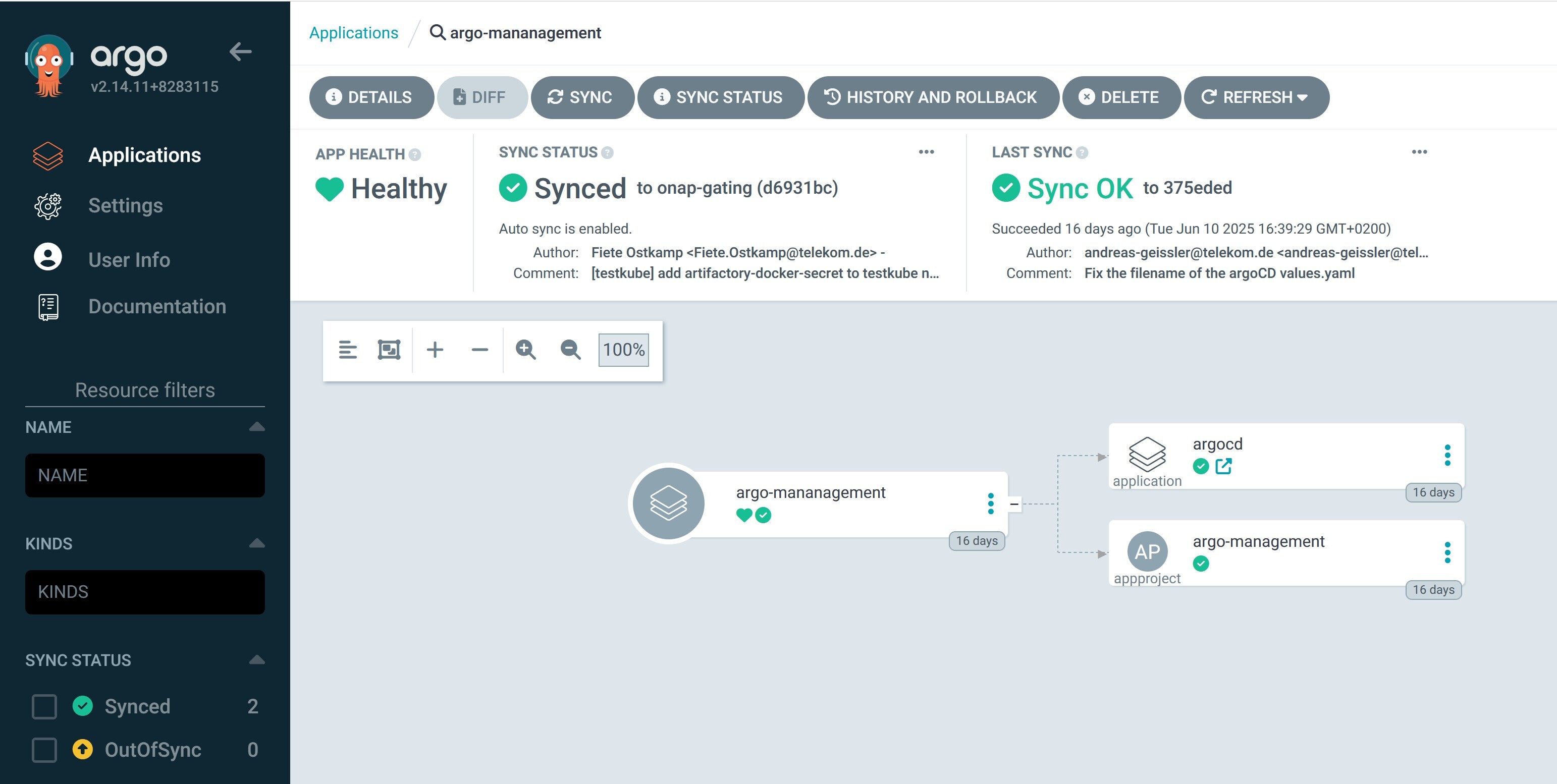
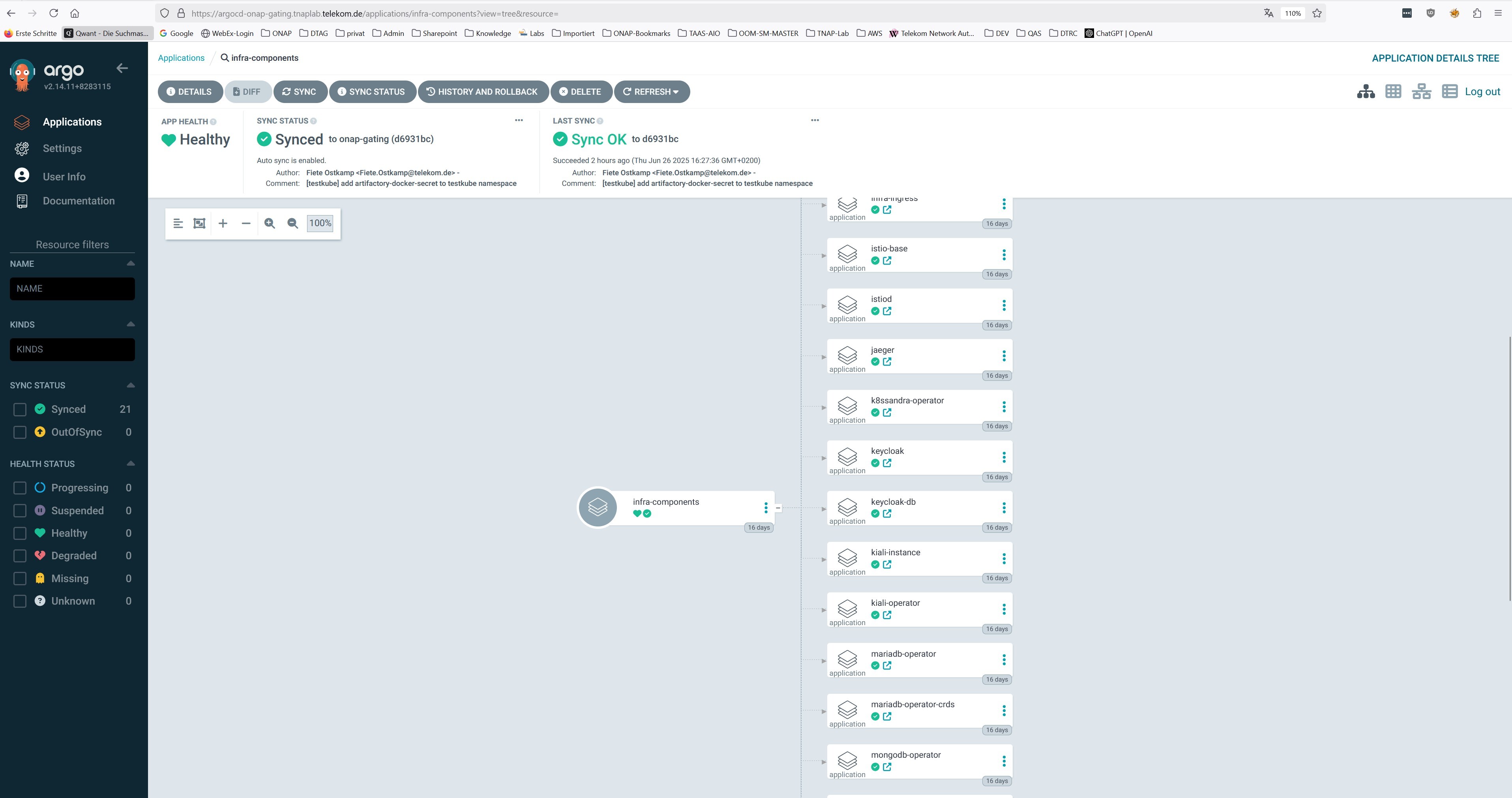
Within the Infrastructure components the “compile-onap” App creates a job, which downloads the “OOM” git repository, compiles the ONAP charts and stores them into the “ChartMuseum” App.
The ChartMuseum is used as Helm Repository for the ONAP Applications. Within the ONAP Application definitions (e.g. in ‘argo/onap/aai.yaml’) you see as source definition the internal Chart Museum Service URL (‘repoURL’).
If you want to use another repository, you need to change the value. The Chart version (‘targetRevision’) is set as “*”, so it uses the latest version it finds.
If you want, you can specify here a fixed release version (e.g. ‘16.0.0’).
apiVersion: argoproj.io/v1alpha1
kind: Application
metadata:
  name: onap-aai
  namespace: argocd
  finalizers:
    - resources-finalizer.argocd.argoproj.io
spec:
  ...
  sources:
  - repoURL: '<ONAP_ARGO_REPO_URL>'
    targetRevision: <ONAP_ARGO_BRANCH>
    ref: defaultValues
  - repoURL: http://chartmuseum.chartmuseum:8080
    chart: aai
    targetRevision: "*"
    helm:
      ignoreMissingValueFiles: true
      valueFiles:
      - $defaultValues/argo/onap/values/values-global.yaml
      - $defaultValues/argo/onap/values/aai.yaml
...
Installation of the ONAP Applications
The deployment of ONAP components is shown here as “App of Apps” application.
The selection of the ONAP component can be done via the kustomization.yaml file.
If the “App of Apps” pattern is not wanted, the components an also be deployed individually.
The definition files can be found in the directory ‘argo/onap’:
app-onap.yaml - (AppOfApps-)Application definition file points to the same directory and uses kustomization.yaml
kustomization.yaml - Kustomize file with resources collection for the “App of Apps” Application
a1policymanagement.yaml - Application definition for A1 Policy Management
aai.yaml - Application definition for AAI component
authentication.yaml - Application definition for Authentication component
cds.yaml - Application definition for CDS component
common/cassandra.yaml - Application definition for the common CASSANDRA DB instance
common/mariadb-galera.yaml - Application definition for the common MariaDB instance
common/postgres.yaml - Application definition for the common Postgres DB instance
common/repository-wrapper.yaml - Application definition for the common Repository Wrapper
common/roles-wrapper.yaml - Application definition for the common Roles Wrapper (optional)
cps.yaml - Application definition for CPS component
dcaegen2-services.yaml - Application definition for DCAEGEN2-SERVICES component
multicloud.yaml - Application definition for MULTICLOUD component
platform.yaml - Application definition for PLATFORM component
policy.yaml - Application definition for POLICY component
portal-ng.yaml - Application definition for PORTAL-NG component
sdc.yaml - Application definition for SDC component
sdnc.yaml - Application definition for SDNC component
so.yaml - Application definition for SO component
strimzi.yaml - Application definition for STRIMZI component
uui.yaml - Application definition for UUI component
values/* - values definition for all ONAP applications + common values-global.yaml
To deploy the ONAP (AppOfApps-)application, you can add it via kubectl command:
> kubectl apply -f argo/onap/app-onap.yaml
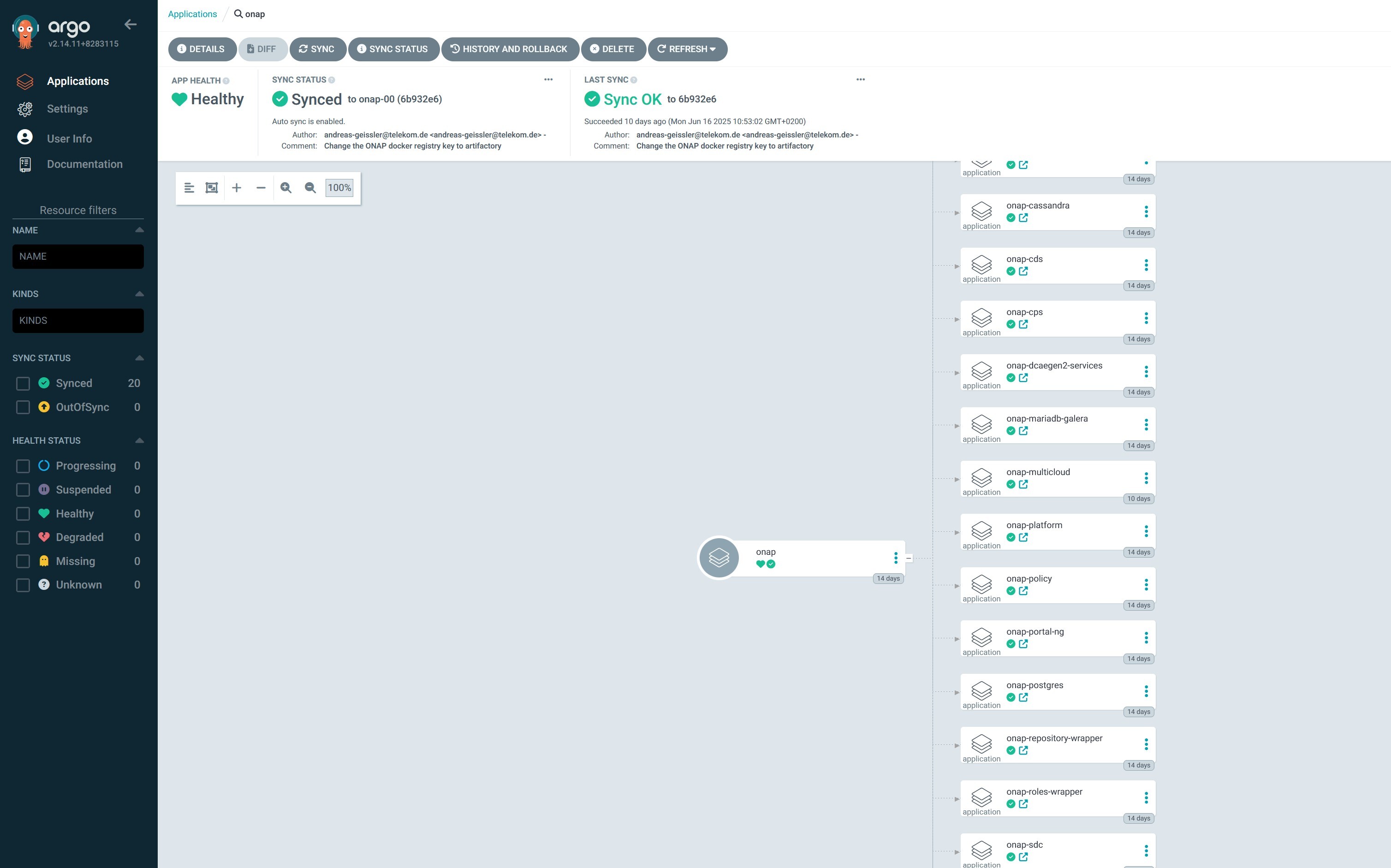
You should see in the UI the Application trees of “onap”
Installation of the ONAP Test Applications
As we use the ArgoCD deployment also for testing the ONAP components, we decided to add an application set to deploy testing components.
The definition files can be found in the directory ‘argo/onap-test’:
app-onap-test.yaml - (AppOfApps-)Application definition file points to the same directory and uses kustomization.yaml
kustomization.yaml - Kustomize file with resources collection for the “App of Apps” Application
kafka-ui.yaml - Application definition for Kafka UI
onap-test-ingress.yaml - Application definition for a local helm chart for Ingress routes (ingress-routes)
ingress-routes/helm - Helm chart with ingress definition for KAfka UI Application and Ingress Gateway
testkube.yaml - Application definition for the TESTKUBE Chart deployent for running ONAP tests
testkube/helm/* - Helm chart for the TESTKUBE application
testkube/pythonsdk-tests/* - TESTKUBE test definitions based on ONAP PythonSDK
values/* - values definition for all ONAP Test applications
To deploy the ONAP-Test (AppOfApps-)application, you can add it via kubectl command:
> kubectl apply -f argo/onap-test/app-onap-test.yaml
URLs of Applications
Besides the ONAP applications the following applications are exposed via Ingress:
ArgoCD:
https://argocd<POSTADDR>.<BASEURL>(admin/gating)Kafka-UI:
https://kafka-ui<POSTADDR>.<BASEURL>Cassandra-Reaper:
https://reaper-dc1<POSTADDR>.<BASEURL>(see secret “cassandra-reaper-ui”)Testkube:
https://testkube<POSTADDR>.<BASEURL>DefectDojo:
https://defectdojo<POSTADDR>.<BASEURL>(admin/gating)Grafana:
https://grafana<POSTADDR>.<BASEURL>(admin/prom-operator)Kiali:
https://kiali<POSTADDR>.<BASEURL>Jaeger:
https://jaeger<POSTADDR>.<BASEURL>Keycloak:
https://keycloak-ui<POSTADDR>.<BASEURL>(admin/secret)
ONAP applications follow the same schema, e.g. portal-ng:
PortalNG:
https://portal-ng-ui<POSTADDR>.<BASEURL>…